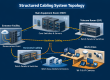

Every business runs on connections: computers, phones, security cameras, card readers, point-of-sale systems, and Wi-Fi. Behind the walls and above the ceiling tiles, all of them depend on one thing, your cabling. Structured cabling is the standardized, organized system that keeps them all working, today and as your business grows.

What Is Structured Cabling?
Structured cabling is a planned, building-wide cabling system that carries data, voice, video, and security signals. Instead of running a new, one-off cable every time someone adds a device, a structured system follows common industry standards (such as the ANSI/TIA-568 family) and uses standard components, so everything connects in an orderly, predictable way.
Think of it as the plumbing of your network. When it is designed well, nobody notices it. When it is done poorly, everything slows down, drops out, or becomes impossible to troubleshoot.
The opposite of structured cabling is what many offices end up with over the years: cables added one at a time, different types mixed together, nothing labeled, and a closet nobody wants to touch. It may work most days, but it is fragile, hard to expand, and expensive to fix when something goes wrong.
What Does a Structured Cabling System Include?
A complete system has six main parts. Each one has a job, and the system is only as strong as its weakest link.
- Entrance facility: where your internet, phone, and other outside services enter the building and connect to your internal network.
- Equipment room or server room: the home of your core switches, firewall, servers, and main equipment, usually with proper power, cooling, and grounding.
- Backbone cabling: the main links between rooms, floors, or buildings. These are often fiber optic because fiber carries more data over longer distances and is not affected by electrical interference.
- Telecom rooms and patch panels (MDF/IDF): the distribution points where cables end on patch panels. Short patch cables then connect each run to a switch, so changes take minutes instead of hours.
- Horizontal cabling: copper cable, such as Cat6 or Cat6A, running from the telecom room to each wall jack, access point, or camera. Standards limit a permanent run to 90 meters, plus patch cords at each end, for a 100-meter channel.
- Work area outlets: the wall jacks where computers, phones, printers, and other devices plug in.
Good systems also include the parts you do not see: cable pathways such as conduit, J-hooks, and cable trays; grounding and bonding; firestopping; and clear labels and documentation.
Why Your Business Needs It
Reliability
Quality cable, correct terminations, and testing reduce dropped connections, slow file transfers, and choppy video calls. Many problems blamed on “the internet” turn out to be cabling problems, such as a damaged cable, a bad connector, or a run that is too long.
Speed Today and Room to Grow
Cable inside walls is expensive to replace, so it pays to install it once and install it right. A well-planned system supports the speeds you need now and the ones you will want later, such as more cameras, VoIP phones, Wi-Fi 6 and Wi-Fi 7 access points, video conferencing, and cloud applications.
Lower Downtime and Faster Repairs
Clear labeling and organized patch panels mean a technician can find and fix an issue in minutes instead of tracing a tangle of cables. Moves, adds, and changes, such as relocating a desk or adding a printer, become simple. That saves you labor costs and keeps your team working.
Safety and Code Compliance
Cabling in California commercial buildings must follow electrical and fire codes. That includes using the correct cable rating for the space (for example, plenum-rated cable in air-handling spaces), firestopping where cables pass through fire-rated walls and floors, and keeping low-voltage cable properly separated from power wiring. Professional installers know these rules and the requirements of your local building department.
A Foundation for Security Systems
IP security cameras, access control, and alarm systems all depend on solid network cabling. Power over Ethernet (PoE) lets a single cable carry both data and power to a camera, phone, or access point, which cuts installation cost and makes devices easy to relocate. It only works reliably if the cable is good quality and stays within the 100-meter limit for copper Ethernet.
Choosing the Right Cable: A Quick Overview

Not all cable is the same. The right choice depends on your building, your equipment, and how much growth you expect.
- Cat5e: older, supports gigabit speeds, and is still found in many buildings. It is usually not worth installing in new projects.
- Cat6: supports gigabit speeds and can handle 10 Gigabit over shorter runs (about 55 meters). A common choice for general office use.
- Cat6A: supports 10 Gigabit over the full 100 meters and has better protection against interference. It is the preferred choice for new installations, Wi-Fi access points, and anywhere you want to be future-ready.
- Fiber optic: used for backbone links between rooms and buildings, and for very high speeds or long distances. Single-mode fiber covers the longest distances.
We will go deeper on this in a future article comparing Cat6, Cat6A, and fiber.
Signs It’s Time to Upgrade Your Cabling
If any of these sound familiar, a cabling assessment is worth your time:
- Slow or unreliable connections even though you pay for a fast internet plan.
- Old Cat5 cable, unlabeled cables, or a messy “spaghetti” closet.
- You are moving offices, expanding, or remodeling.
- You are adding security cameras, VoIP phones, or Wi-Fi access points.
- Cables run across floors or ceilings without support, or are held up with temporary fixes.
- Nobody knows where a cable goes or what it connects.
- Your Wi-Fi has dead spots because access points are not wired for enough speed.
What to Expect From a Professional Installation

- Site survey and design: a walk-through of the space to plan cable paths, equipment rooms, outlet locations, and future needs. You get a clear scope before work begins.
- Installation: pulling cable, mounting jacks and patch panels, supporting cable properly, firestopping penetrations, and organizing the rack.
- Testing and certification: every run is tested with professional equipment to confirm it meets performance standards. You should receive the results.
- Labeling and documentation: every cable, jack, and port is labeled and recorded, so future changes and repairs are fast.
- Walkthrough and support: a final review with you, and a warranty or follow-up if anything needs adjusting.
Common Mistakes to Avoid
- Choosing on price alone. Low bids often skip testing, labeling, or code requirements, which costs more later.
- Skipping future needs. Adding extra outlets and spare capacity during construction is far cheaper than doing it later.
- Mixing in cheap or counterfeit cable. Poor-quality cable can fail testing or struggle with PoE.
- Running cable too close to power lines. This can cause interference and is also a code issue.
- No documentation. Without labels and records, every future change takes longer.

Structured Cabling Across California
Whether you run a small office in the San Francisco Bay Area, a retail location in Sacramento, or a multi-site operation in Los Angeles, the fundamentals are the same: a clean design, quality materials, code-compliant installation, and careful testing. Older buildings may need extra planning for pathways, while new construction is the best time to build in extra capacity.
Scio Info Tech provides structured cabling, IT security, CCTV, and network management for businesses across California, so your network, cameras, and access control can all be planned together.
Ready to Get Started?
If your network feels slow, outdated, or hard to manage, we can review your space and recommend the right solution. Tell us about your project and we will get back to you.